How to build an options screener with AI
Written and reviewed by ConvexValue · Updated July 24, 2026
Off-the-shelf screeners make you choose from their filters. The moment your question needs a comparison they did not ship—such as current session volume greater than open interest—you either simplify the question, export data, or write a separate tool.
cvforge takes a different route: describe the tool, let your AI agent write the app, and use the connected options snapshot from the first run. This walkthrough uses one exact, reproducible build.
1. Install and start a blank app
Download cvforge (free; macOS, Windows, and Linux), sign in, and click New app. Claude Code and Codex have first-class support; other coding agents can work with the same setup.
The app supplies the data connection and local runtime. You do not need a separate vendor account to build inside cvforge.
2. Use this exact prompt
Build a U.S. options contract screener with cvApi.screen. Return underlying ticker, contract ticker, call or put, expiration, strike, fair_market_value, day_volume, open_interest, implied_volatility, and underlying price. Keep contracts where day_volume is greater than open_interest, open_interest is at least 100, and day_volume is at least 100. Compute a Volume/OI column in the app, sort by day_volume descending, cap the table at 100 rows, and add controls for symbol, contract type, minimum open interest, and row limit. Show the snapshot refresh time, label fair market value as a non-executable estimate, and label the result research only.
This prompt is specific about four things an agent otherwise has to guess:
the endpoint shape, returned fields, server-side filters, and visible controls.
The field comparison maps to gt_field, which is documented in the
Options Screener API reference.
3. Check the first output
Before styling anything, verify the table against the request:
- The columns include
day_volume,open_interest, andimplied_volatility. - Every visible row has volume greater than open interest and meets the minimum-volume rule.
- Volume/OI is calculated from those returned values, not invented.
- The sort is descending by session volume.
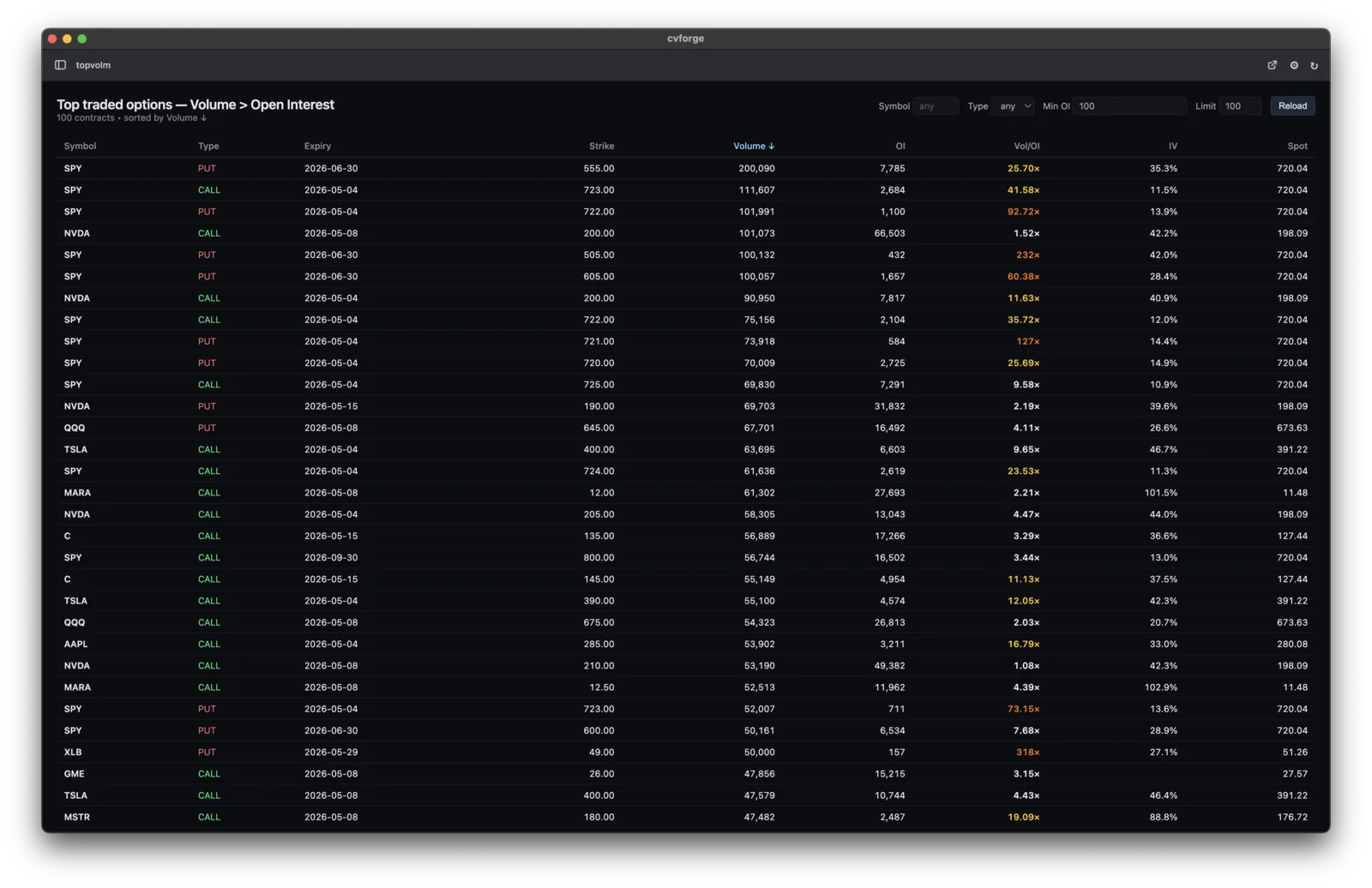
- The page shows a refresh timestamp and stops at the requested row limit.
The screenshot above is the expected shape: a contract shortlist with the evidence fields visible. Values change with the market; the schema and rules should not.
4. Iterate one rule at a time
Useful follow-up prompts are small and testable:
- “Add a 14–60 DTE filter and show the computed DTE.”
- “Keep only contracts with absolute delta between 0.20 and 0.40.”
- “Require session volume of at least 500.”
- “Group by underlying and keep the highest-volume contract per ticker.”
- “Color the ratio only when open interest is at least 500.”
After each change, inspect at least a few rows. AI writes the implementation; it does not remove the need to check that a filter was applied before sorting and that the displayed label matches the underlying field.
Data cadence and limits
The options serving snapshot refreshes about once a minute. Session volume changes intraday. Open interest updates daily after the close when the exchange publishes the next value. A Volume/OI ratio therefore compares two different clocks; the volume-versus-open-interest guide explains the interpretation.
For current contract valuation, cvforge provides Massive fair market value (FMV), a proprietary estimate. It does not provide option bids, asks, midpoint, NBBO, quote sizes, or last trades, so the screener cannot measure executable liquidity or a quoted spread.
The /screen request allows up to 16 filters, 4 sort keys, 32 returned columns,
and 500 rows. It is available on every plan. The Free plan includes 20 requests
per hour, so a one-minute auto-refresh would exhaust it quickly; refresh
manually or choose a longer interval. See plans and limits.
What this screener does not prove
The result is a snapshot-based research shortlist. A large Volume/OI ratio does not identify who traded, whether positions opened or closed, buyer/seller direction, or future price direction. cvforge does not turn a descriptive filter into a trade recommendation.
Start from the curated volume/open-interest template, compare it with the current implied-volatility template, or return to the custom options screener overview.