Options Volume Screener — Volume Greater Than Open Interest
Built, written, and reviewed by ConvexValue · Updated July 24, 2026
Build a reusable options volume screener that compares each contract's current-session volume with open interest, ranks the result, and documents what the ratio can and cannot tell you.
Data cadence
The options serving snapshot refreshes about once a minute; session volume changes intraday, while exchange-published open interest updates daily after the close.
Plan requirements
The screen endpoint is available on every cvforge data plan. Free includes 20 requests per hour; the result is capped at 500 rows per request.
Exact prompt
Build a U.S. options contract screener with cvApi.screen. Return underlying ticker, contract ticker, call or put, expiration, strike, fair_market_value, day_volume, open_interest, implied_volatility, and underlying price. Keep contracts where day_volume is greater than open_interest, open_interest is at least 100, and day_volume is at least 100. Compute a Volume/OI column in the app, sort by day_volume descending, cap the table at 100 rows, and add controls for symbol, contract type, minimum open interest, and row limit. Show the snapshot refresh time, label fair market value as a non-executable estimate, and label the result research only.
Fields used
underlying_ticker, ticker, contract_type, expiration_date, strike_price, fair_market_value, day_volume, open_interest, implied_volatility, underlying_price
What this template does
The first filter is evaluated by the server with the field-to-field operator
day_volume gt_field open_interest. That matters: the app does not download an
entire market snapshot and hope the browser can sort it. It asks the constrained
Options Screener API for matching rows, then calculates
the displayed ratio from the two returned fields.
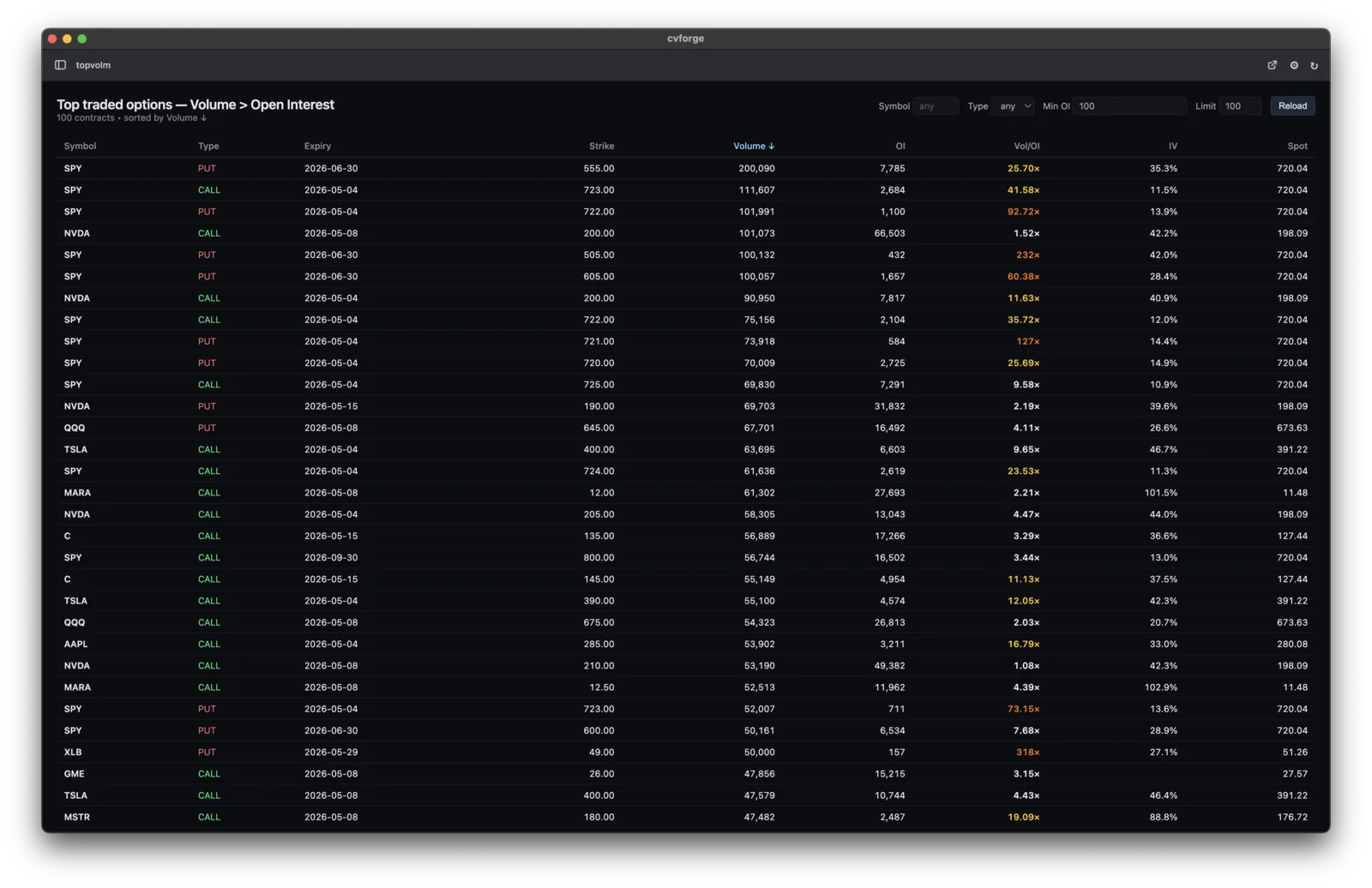
The screenshot above is from a cvforge-built contract table using this same snapshot surface. It shows the exact evidence fields—volume, open interest, Volume/OI, current implied volatility, and underlying spot—rather than a generic product mockup.
Read the ratio carefully
If a contract shows volume of 5,000 and open interest of 1,000, its displayed ratio is 5.0. That says the current session’s cumulative volume is five times the latest published open-interest count. It does not say those trades were opening, bullish, institutional, or initiated on one side of the market.
Use the result as a shortlist for research. Inspect activity, open interest, expiration, strike, underlying context, and the different timestamps before drawing a conclusion. The methodology guide explains the clocks in more detail: options volume versus open interest.
Useful edits to ask for next
- “Group the first page by underlying and keep only the highest-volume contract per ticker.”
- “Exclude contracts expiring in fewer than seven days and require session volume of at least 500.”
- “Color the ratio only when open interest is at least 500.”
- “Let me export the visible research shortlist as CSV.”
For other screening jobs, start at the custom options screener or use the current implied-volatility template.
Limitations
- Volume divided by open interest is a descriptive contract-level ratio, not transaction classification or evidence of buyer/seller direction.
- Open interest is the latest daily exchange publication, while volume accumulates during the current session, so the two fields have different clocks.
- Low-activity contracts and tiny open-interest denominators can create extreme ratios; minimum volume and open-interest filters reduce but do not remove that problem.
- cvforge provides Massive fair market value estimates, not option bid/ask quotes, midpoint, NBBO, or last trades; this template cannot measure the quoted spread or executable liquidity.
- The template is for research and education, not investment advice or an order-execution tool.
Search focus: options volume screener. Related: high-volume options screener, volume vs open interest scanner, options volume greater than open interest.